One phone, side-on. One recording per batter or bowler.
Set the phone up once, record a batter's whole set or a bowler's whole spell, and let BatSwing split it into balls or deliveries. Your coach confirms each one, and the record builds up session after session.
LiveBatting set-upLiveBowling set-upWhat you need, feature by feature
Where the phone goes: batting.
Side-on, square to the batter. On the off side, level with the batting crease, looking straight across at the batter.
At a marked distance. Far enough that the whole batter and the bat stay in frame from stance to follow-through, with the stumps and crease in shot. Mark the spot so every session is filmed the same way. [FOUNDER: recommended distance]
Steady and level. A small tripod or a clamp on the net frame, at about [FOUNDER: recommended height]. Sound on.
One batter in shot. Keep other players out of the frame while the batter is recording.
Where the phone goes: bowling.
Live Bowling
One bowler per clip. BatSwing counts each delivery it finds, so a second bowler's deliveries would be counted too.
Side-on, from the bowling-arm side. Level with the bowler's popping crease, on the bowler's right for a right-armer, so the bowling arm faces the lens.
Landscape, on a tripod outside the net. Still for the whole spell.
The whole action in frame. Both feet, the head, the raised arm and the follow-through.
No sound needed. Deliveries are found from the bowler's movement.
Tested on demo data and broadcast clips so far.
What a front-on phone adds.
Pilot Batting · automatic sync
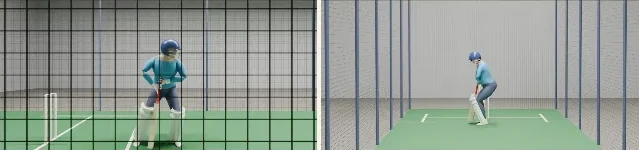
Put a second phone behind the bowler's end, looking straight down the pitch at the batter. BatSwing lines the two recordings up using the sound of bat on ball, so each ball plays back from both angles, side by side and in sync.
The extra set-up
- A second phone and stand, behind the bowler's end and out of the bowler's way.
- Both phones recording, with sound on, before the first ball.
Pilot feature. Sync thresholds are not yet validated on real footage.
Slow motion or normal speed?
Frame rate is a separate choice from adding a camera. It changes how smooth a single angle looks; it doesn't add a new angle.
Normal speed
The default. Records sound at normal speed, which is what BatSwing listens to when it splits a batter's set into balls and lines up a second phone. Fine for the ball sheet, progress and replay. Bowling doesn't need the sound.
Slow motion
Smoother frames around contact, which can help a coach see the moment of impact. But many phones change or drop the sound in slow-motion mode, and files are much larger. Without normal-speed sound, ball splitting and two-phone sync get less reliable.
[FOUNDER: is slow-motion upload supported in the pilot?]
What the coach does: batting.
Pick the drill. The coach picks the drill once: shot, type of bowling, length, feed and pace. BatSwing doesn't try to work out what was bowled.
Record the set. One continuous recording per batter, up to about 10 minutes. No stopping and starting the camera between balls.
Review the balls. BatSwing splits the recording into balls. The coach checks them, drops a false one or adds one it missed.
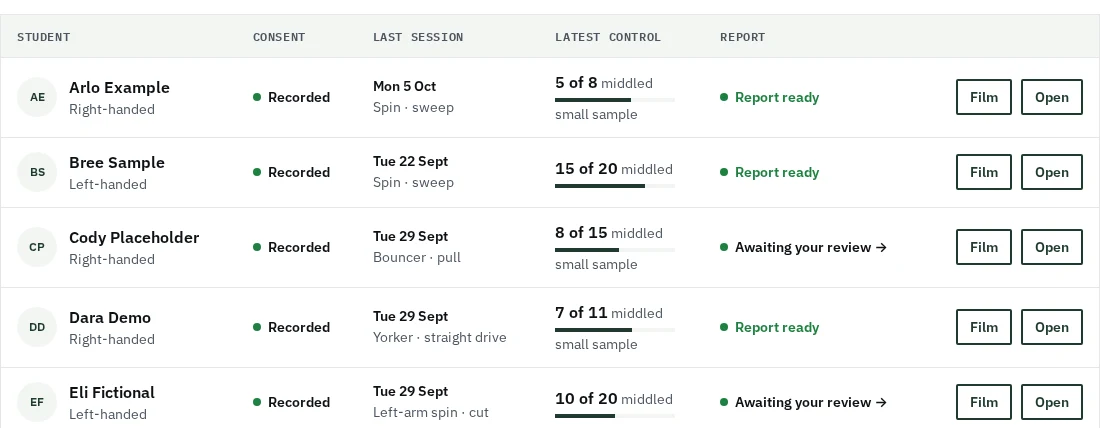
Tap an outcome for each ball. Middled, edge, beaten, missed, left or unknown. A computer suggestion never counts until the coach taps. Tap again to correct it.
Share. The player sees their own progress. The coach approves a report with the academy's logo and shares it through WhatsApp or any messaging app.
What the coach does: bowling.
Pick the bowler. One bowler per clip. The coach sets the target length for the session.
Record the spell. One continuous recording, up to about 10 minutes. No stopping the camera between deliveries.
Review the deliveries. BatSwing splits the spell into deliveries. The coach drops a false one or adds one it missed.
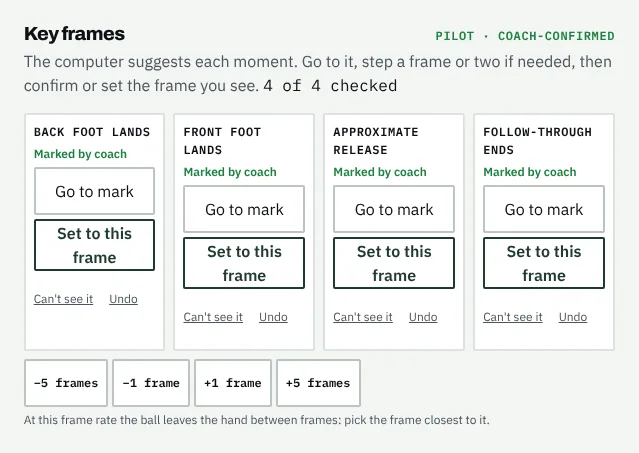
Confirm the key frames. Back foot lands, front foot lands, approximate release, follow-through ends. Confirm each suggestion, step a frame, or mark it not visible.
Tag the landing and the front foot. Full, good or short, or not seen; the front foot behind, on or over the line. The coach's call, not ball tracking.
Share. Confirmed deliveries add up to recorded bowling. The coach approves a bowling report with the academy's logo.
Shown here on demo data.
What you need, feature by feature.
Liveworks todayPilotpilot featurePreviewmade by our team from one public nets clip, not in the app yetComing next–not for that sport
| Feature | Batting | Bowling | Phones |
|---|---|---|---|
| One recording, split into balls or deliveries | Live | Live | One |
| The coach's one-tap ball sheet | Live | Not offered | One |
| Key frames of each delivery | Not offered | Live | One |
| Where it met the bat (coach-marked) | Pilot | Not offered | One |
| Where it went (coach-tagged) | Pilot | Not offered | One |
| Footwork vs crease (coach-calibrated) | Pilot | Not offered | One, raised |
| Where it landed and the front foot (coach-tagged) | Not offered | Live | One |
| Progress and trends by drill | Live | Not offered | One |
| Recorded bowling, beside your guideline | Not offered | Live | One |
| Ghost overlay | Pilot | Live | One |
| 2.5D replay (layered cut-outs of the real frames, not 3D) | Live | Not offered | One |
| Focus | Pilot | Pilot | One |
| Teaching clip | Pilot | Not offered | One |
| Report with your logo, and a words-only parent version | Live | Live | One |
| Player and guardian access | Live | Live | One |
| Two angles, in sync | Pilot | Not offered | Two |
| See the shot from any side | Coming next | Not offered | Two |
| 3D estimate from one camera | Preview | Coming next | One |
One means one side-on phone; two adds a front-on phone behind the bowler's end. Footwork vs crease needs that one phone still and raised, so it sees the whole crease.
What one phone can't see.
One camera has no depth. So BatSwing gives no joint angles, no bat or ball speed, no line and length and no measured bat path, and knee bend can't be seen side-on at all. Replays draw the bat's path as a shape from one camera, to look at, never as a number. For bowlers, a side-on phone shows length but not line, and BatSwing never calls an action legal or not. The 3D estimate from one camera is a preview, not a measurement: it stays close to the angle the phone filmed from and never shows a number. It needs the phone fixed on a tripod, side-on, with the stumps in view, and a one-time set of taps on the stumps and crease. It comes to batting first, then bowling. Read what it can and can't see.
See it with your own drills.
A 20-minute call. No footage or player details needed to book.
Book a demo →